Image Size Checker

Instantly check image dimensions, file size, aspect ratio, megapixels, and print size - privately in your browser.

Check an image

Drop an image here

or paste an image from your clipboard

JPG, PNG, WebP, GIF, SVG, AVIF, or BMP. Maximum 100 MB.

Private: your image is processed locally and never uploaded.

Check Image Size Without Uploading Your File

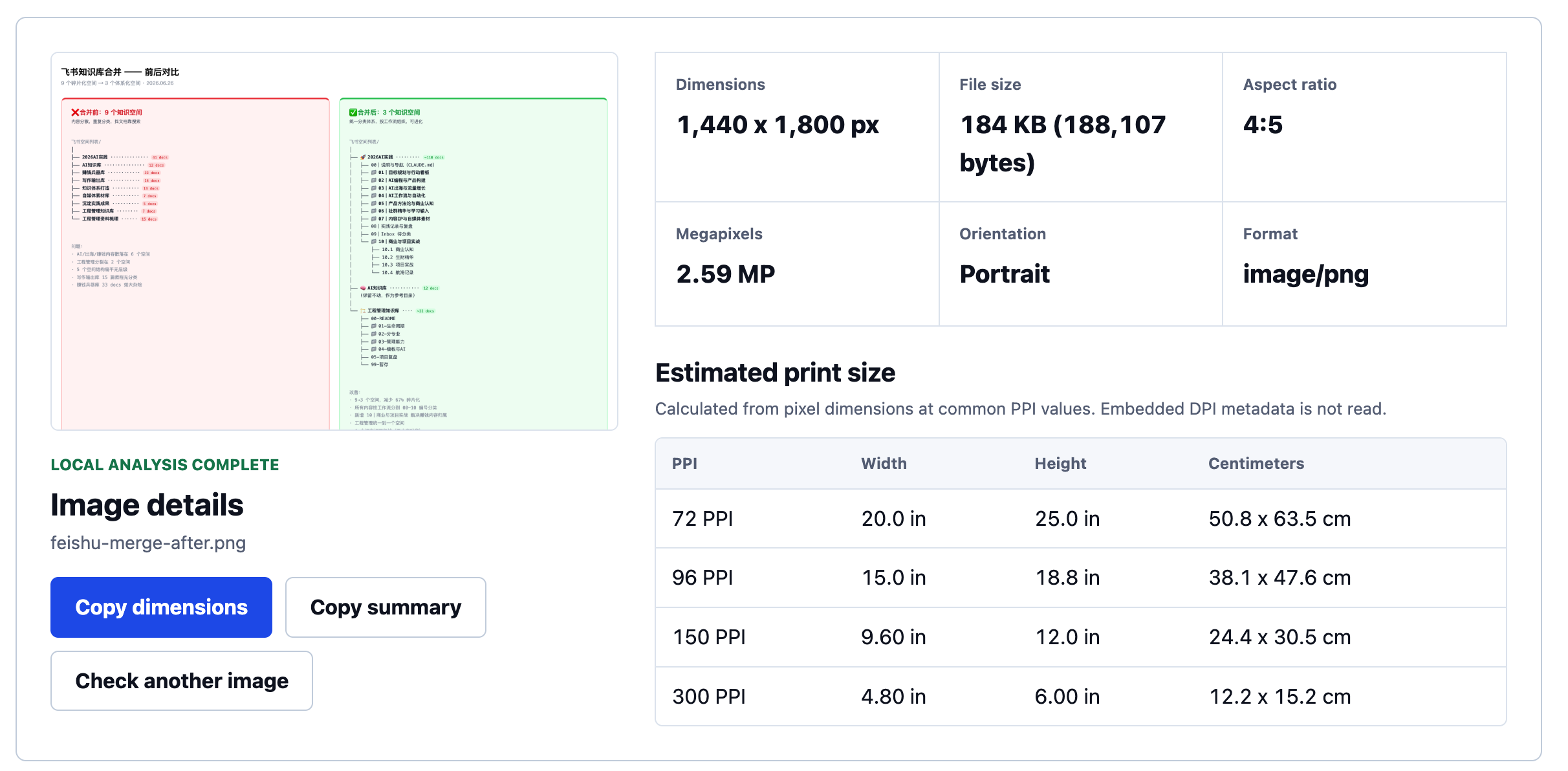
Image Size Check is a free online image size checker for reviewing an image before publishing, sharing, cropping, or printing it. Choose, drop, or paste a file to see its pixel dimensions, file size, aspect ratio, megapixels, orientation, format, and estimated print sizes at common PPI values.

There is no account, installation, or upload step. Your image is decoded by the browser and never sent to a server, making the tool suitable for private drafts, client assets, product photos, and screenshots. Resetting or closing the page releases the temporary preview.

What Does the Image Size Checker Show?

An image can have several different kinds of "size," and each one answers a different question. This image size finder keeps those measurements separate so you can use the right number for the task in front of you.

Pixel Dimensions

The image size checker reports an image's width and height in pixels, such as 1920 x 1080. These pixel dimensions describe the image grid used for screen layouts, crops, exports, and print calculations. A website asking for a specific width and height usually means pixel dimensions.

File Size

File size is the storage used by the encoded image, shown in bytes, KB, or MB. Two images with identical dimensions can have different file sizes because format, compression, detail, and metadata affect storage. This matters for upload limits and page performance.

Aspect Ratio and Orientation

Aspect ratio expresses the relationship between width and height as 1:1, 3:2, 4:5, or 16:9. It indicates whether an image suits a square thumbnail, portrait frame, landscape banner, or video canvas. The checker also labels its orientation.

Megapixels

Megapixels summarize total pixel count: width multiplied by height, divided by one million. A 2400 x 1600 image contains 3.84 megapixels. This measures pixel quantity, not sharpness, noise, dynamic range, or compression quality.

Format

The result includes the MIME type reported by the file and browser, such as image/jpeg or image/png. The checker accepts JPG, PNG, WebP, GIF, SVG, AVIF, and BMP when the current browser can decode the format.

Decode Status

A corrupt file, incomplete download, mislabeled extension, or unsupported codec may fail to open. A visible error explains the problem so you can choose another image or export a fresh copy.

Image Dimensions, Resolution, and File Size Are Different

People often search for an image resolution checker when they need pixel width and height. "Resolution" can mean pixel dimensions, screen density, or print density. This tool reports the actual image grid and keeps print estimates separate.

A large file is not automatically a high-resolution image. A poorly optimized file may use substantial storage at modest dimensions, while a compressed JPEG can have large dimensions and a small file size. Neither number alone proves sharpness.

Use dimensions for layout requirements, file size for upload limits, aspect ratio for cropping, and megapixels as a pixel-count summary. For print planning, consider dimensions together with intended PPI and viewing distance.

The image size checker reports factual measurements rather than assigning a quality score. Focus, noise, compression artifacts, color, and source sharpness still require visual judgment.
Common Reasons to Check Image Dimensions

Prepare an Image for a Website

Before publishing, use the image size checker to see whether the source is much larger than its display area. Oversized images waste bandwidth and can slow a page. Exact dimensions also help you choose the right crop.

Confirm an Upload Requirement

Marketplaces, forms, and social platforms may specify minimum dimensions, aspect ratios, or file-size limits. Use the image dimension checker to inspect the source, then compare the result with the destination's current requirements.

Review a Design Handoff

Copy the dimensions or result summary into a design brief, ticket, or client message. This prevents confusion when similar exports have different dimensions, formats, or file weights.

Plan a Print

Compare output estimates at several PPI values before ordering a print. The table shows the tradeoff between physical size and pixel density without claiming to judge source quality.

Private, Local Image Processing

The image size checker runs with browser APIs on your device. Image bytes are not uploaded, and the product has no endpoint for storing image files. Analytics must never include image content, file names, local paths, or personal file information.

Local processing avoids waiting for an upload and remote response. Browser support still varies, so a format that works in a current browser may fail in an older one. Unsupported, empty, unusually large, or corrupt files return a visible error.

Frequently Asked Questions

How Can I Check the Size of an Image?

Choose, drop, or paste an image. The result shows dimensions, file size, aspect ratio, megapixels, orientation, format, and estimated print sizes. The file stays in your browser.

Is Image Size the Same as File Size?

No. Image size often refers to width and height in pixels. File size is the storage used by the encoded file. Compression and format can change file size without changing pixel dimensions.

Does Changing DPI Make an Image Higher Quality?

Not by itself. Editing DPI metadata without adding meaningful pixel information does not create detail. Print quality depends mainly on available source pixels, intended physical size, source quality, and the printing process.

What PPI Should I Use for Printing?

300 PPI is common for close-range prints, while 150 PPI may suit larger prints viewed farther away. Ask the print provider when the result matters commercially.

Does the Image Size Checker Upload or Store My Image?

No. Images are decoded locally in your browser. The tool does not upload or retain the selected image on a server. The local preview is released after reset or when the page closes.

Which Image Formats Are Supported?

The checker accepts JPG, PNG, WebP, GIF, SVG, AVIF, and BMP when supported by the browser. It does not currently promise RAW or TIFF decoding, EXIF inspection, animation-frame analysis, or batch reports.

Why Can a Valid-Looking Image Fail?

The file may be empty, corrupt, incomplete, mislabeled, or encoded in a way the browser cannot decode. Try opening it in a trusted image application or exporting a new copy before checking again.

Check Your Image Now

Use the image size checker to confirm the facts before you upload, publish, crop, send, or print. The result is immediate, the calculations are transparent, and your image remains on your device.

Check an image